Cross-Channel Marketing: Best Practices For 2025
16 MIN READ
DIGITAL · 29 Jan 2026 · 15 minLearn how crawl depth, internal linking, URL hierarchy and sitemaps affect indexation and how to reduce crawl waste to boost organic visibility.

Site architecture directly impacts how search engines discover and index your website. A poorly organized structure can waste crawl budgets, leave pages unindexed, and harm your rankings. Here's what you need to know:
/services/seo/ help search engines understand relationships between pages.For larger sites, combining logical hierarchies with efficient internal linking and XML sitemaps ensures better indexing and visibility. Fixing crawl inefficiencies can lead to higher organic traffic and improved rankings.
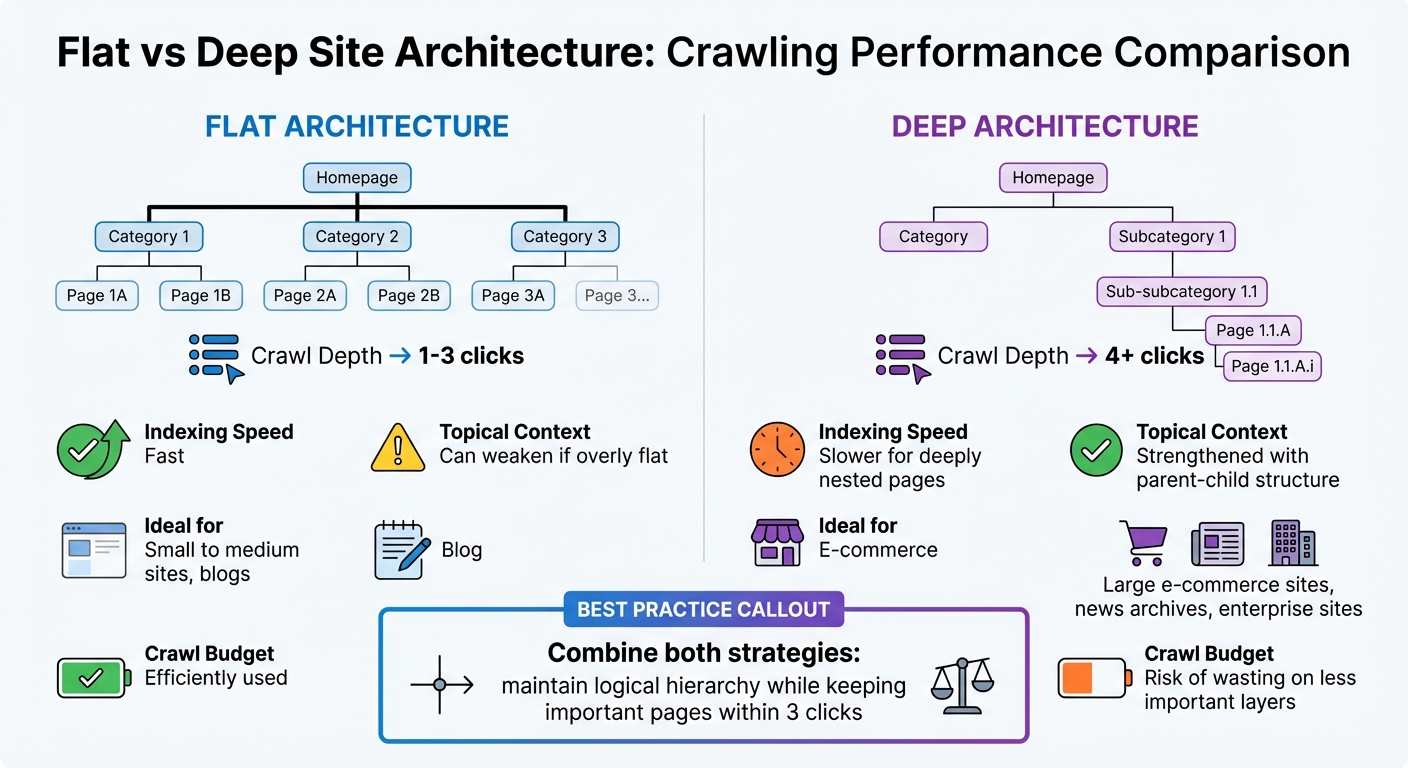
Flat vs Deep Site Architecture: SEO Crawling Performance Comparison
Site architecture - covering crawl depth, URL hierarchy, and internal linking - plays a big role in how efficiently Googlebot crawls your website. Together, these elements determine how well Google allocates its limited crawl budget to your pages.
Crawl depth refers to the number of clicks needed to reach a page from your homepage. Meanwhile, URL hierarchy helps search engines understand the relationships between pages. For example, a URL like /services/digital-marketing/seo/ clearly shows where the page fits within your site. This clarity not only helps distribute link equity from high-authority pages but can also aid search engines in generating organic sitelinks, which can boost click-through rates.
Modern SEO favours a managed hierarchy. As Eugen Platon, Director of SEO & Web Analytics at onwardSEO, puts it:
"Google does not reward 'flatness' per se; it rewards quickly discoverable, well-contextualised pages that can be efficiently crawled and confidently ranked".
Striking the right balance between topical clarity and crawl depth is essential. Keeping key pages within three clicks while maintaining logical parent-child relationships strengthens your site's authority on specific topics. Let’s dive deeper into how crawl depth impacts indexing and compare flat versus deep architectures.
Crawl depth has a direct effect on whether your pages get indexed. For instance, The New York Times ensures that even articles dating back to 1851 are accessible within five clicks of the homepage. For most websites, though, the ideal threshold is tighter - pages more than three clicks away are often harder for crawlers to find and index.
When Googlebot starts crawling, it begins at your homepage and follows internal links to deeper pages. The more clicks it takes to reach a page, the less likely it is to be indexed quickly. A good example of addressing this challenge comes from onwardSEO. In October 2025, they reorganised a 20,000-URL content library into 14 hubs with 180 spokes, reducing crawl depth. This resulted in a 23% increase in click-throughs to deeper pages and a 17% boost in assisted leads.
To stay competitive, especially in markets like the UAE, monitoring your "Depth50" metric - the median crawl depth across your site - is crucial. Aiming for a Depth50 of three or less ensures that no important page is overlooked. Server log analysis can show which pages Googlebot is reaching and highlight any content buried too deeply. One regional services client saw a 41% drop in indexing errors and a 29% rise in long-tail impressions after restructuring their site to keep critical pages within three clicks.
Flat and deep architectures each have their pros and cons, depending on your site's size and goals.
Here’s how the two approaches compare:
| Feature | Flat Architecture | Deep Architecture |
|---|---|---|
| Crawl Depth | Shallow (1–3 clicks) | Deep (4+ clicks) |
| Indexing Speed | Faster for new pages | Slower for deeply nested pages |
| Topical Context | Can weaken if overly flat | Strengthened with parent-child structure |
| Ideal for | Small to medium sites, blogs | Large e-commerce sites, news archives, enterprise sites |
| Crawl Budget | Efficiently used | Risk of wasting on less important layers |
Flat structures are great for smaller sites where every page needs to be immediately accessible. However, for larger sites with thousands of URLs, an overly flat structure can overwhelm navigation and dilute topical signals. Deep architectures are better suited for large-scale sites that need clear hierarchies, as long as hub-and-spoke linking ensures important pages remain accessible.
The best approach often combines both strategies: maintain a logical hierarchy to reinforce topical relationships while ensuring no important page is more than three clicks away. Using breadcrumbs with BreadcrumbList schema can further clarify your structure for crawlers. Additionally, server-side rendering (SSR) for your main navigation ensures Googlebot sees all your links, potentially boosting crawl allocation to deeper content by 15–28%. Lastly, blocking low-priority URLs (like filtered search results) via robots.txt helps save crawl budget for your most valuable pages.
Internal links play a key role in guiding search engine crawlers to pages that might otherwise remain hidden. Without an effective internal linking strategy, important content can become "orphaned", making it invisible to crawlers and, by extension, to search engines. This can result in valuable pages being overlooked. Internal links also help distribute link equity, allowing high-authority pages to boost the visibility of lower-profile content.
Different types of internal links have varying levels of impact. For example, contextual links embedded within the body of a page carry more weight because they are directly relevant to the content's topic. On the other hand, breadcrumbs serve a dual purpose: they help users navigate the site while also signalling a clear hierarchy to search engines, which aids in PageRank calculations. As John Mueller, Senior Search Analyst at Google, explains:
"Internal linking is super critical for SEO. It's one of the biggest things you can do on a website to guide Google and visitors to the pages that you think are important."
A study examining 2.5 million contextual links revealed that 71% are located within the first two levels of a site's hierarchy, with fewer than 6% appearing at four or more clicks from the homepage. Additionally, 81% of internal anchor text is keyword-rich, while 15% uses generic phrases like "read more", which misses an opportunity to provide better context for search engines. To improve crawl efficiency, use descriptive anchor text that reflects the content of the linked page and avoid placing important pages more than three clicks away. In one case, restructuring a site's navigation and internal linking led to a 131% increase in organic traffic in under three months. Regular audits can help identify orphaned pages and ensure they receive proper attention from crawlers.
Breadcrumbs provide a clear navigational trail from the homepage to any specific page, making it easier for both users and crawlers to understand the site’s structure. Google's Gary Illyes has confirmed that breadcrumbs are treated like regular links in PageRank calculations. Adding breadcrumbs to every page strengthens your site's hierarchy and reduces the depth at which content is buried, ensuring deeper pages remain accessible.
Structured navigation, such as main menus and category pages, defines the overall framework of a site. While these navigational links establish primary architecture, contextual links within content often carry more SEO value by directly connecting related topics. For instance, linking from a well-established blog post to a new article not only transfers link equity but also signals relevance, helping the new page rank more effectively.
| Link Type | Primary Function | SEO Impact |
|---|---|---|
| Navigational | Facilitates movement via menus/footers | Establishes site architecture and hierarchy |
| Contextual | Connects related content in body text | Transfers link equity and reinforces topic relevance |
| Breadcrumbs | Displays path from homepage to a page | Provides hierarchy signals and reduces crawl depth |
Search engines generally have a crawl limit of 150 to 200 links per page. To maximize efficiency, prioritize links to high-value pages and avoid overwhelming crawlers with excessive links. Using a hub-and-spoke model - where central pillar pages link to detailed cluster articles - can maintain a logical structure and keep all content accessible within three or four clicks.
Orphaned pages, which have no internal links pointing to them, are nearly impossible for search engines to discover through normal crawling. Even if these pages attract external backlinks or direct traffic, they risk being removed from the index without proper internal connections. As John Mueller has noted:
"Orphaned pages may be noindexed."
To address this, start by conducting a technical audit using tools to identify pages listed in your sitemap or analytics but lacking internal links. Once identified, incorporate these pages into your site’s structure by linking to them from relevant category pages, blog posts, or hub articles. Use descriptive anchor text to clearly indicate the content of the linked page and ensure that no important pages are buried beyond three clicks. For smaller websites with fewer than 10,000 pages, aim to keep all content accessible within four clicks from the homepage. Larger sites should focus on linking their most crucial conversion pages directly from the homepage or main navigation to maximize link equity and ensure frequent crawling. This strategy not only improves indexation but also ensures link authority is distributed effectively throughout the site.
After improving internal linking, XML sitemaps play a crucial role in ensuring that deeper or orphaned pages get attention from search engine crawlers. Think of an XML sitemap as a roadmap that lists essential URLs for indexing. Interestingly, about 20% of content discovery happens through sitemaps, making them an important addition to your site’s structure.
Sitemaps work hand-in-hand with internal links by guiding crawlers to content that might otherwise be overlooked. As John Mueller, Google’s Search Advocate, explains:
"Having an XML sitemap is a 'minimal baseline for any serious website.'"
To make your sitemap effective, it must align with your technical settings. Avoid including URLs that are blocked by robots.txt, marked as noindex, or set as non-canonical. This helps save your crawl budget. Focus only on listing 200-status canonical URLs that you actually want indexed. Combined with strong internal linking, sitemaps create a more efficient and cohesive crawling strategy.
For larger, more complex websites, following best practices ensures that sitemaps remain manageable and effective. If your site exceeds the limit - 50,000 URLs or 50 MB uncompressed per XML file - split the sitemap into multiple files. Use a sitemap index file to group these files together.
Organising sitemaps by sections, such as separate files for products or blog posts, can help you track indexing issues through tools like Google Search Console. This also allows you to prioritize high-value pages, often referred to as "money pages", while excluding less important utility pages.
Another tip: use the <lastmod> tag to highlight recent updates. Microsoft Bing stresses its importance:
"For XML sitemaps, one of the most critical tags you can include in your sitemap is the 'lastmod' tag."
Make sure the dates follow the W3C Datetime format and reflect actual content updates. On the other hand, skip the <priority> tag entirely. Google doesn’t use it, with Gary Illyes describing it as "essentially a bag of noise".
Finally, list your sitemap in your robots.txt file so search engines can easily locate it. If your site frequently changes, consider using dynamic sitemaps that automatically update whenever pages are added, edited, or removed.
Sitemaps do more than list URLs - they can also work with structured data to clarify your site’s organization. For example, while a sitemap index file can group multiple sitemaps by category, adding breadcrumb schema (BreadcrumbList) to your pages helps search engines understand how different pages are connected within your site.
| XML Tag | Requirement | Purpose |
|---|---|---|
<urlset> |
Required | Encapsulates the file and references the protocol standard |
<loc> |
Required | Provides the full, canonical URL of the page |
<lastmod> |
Optional | Indicates when the page was last significantly updated |
<changefreq> |
Optional | Suggests how often content changes (limited impact) |
<priority> |
Optional | Shows relative importance (ignored by Google) |
Sitemaps are not a substitute for solid internal linking. Instead, they act as a backup to ensure no page is missed. As Search Engine Land puts it:
"XML sitemaps should act as a safety net and not a replacement for proper site architecture."
Even with solid internal linking and well-organized sitemaps, many websites encounter technical issues that hinder efficient crawling by search engines. On enterprise-level sites, as much as 70% of the crawl budget can be spent on low-value pages. This means search engine crawlers often waste time on content that doesn’t impact rankings, leaving critical pages potentially overlooked.
A good crawl efficiency ratio should dedicate 60–70% of the crawl budget to high-value pages, with the remaining 30–40% going to less important content. If less than 50% of strategic pages are crawled, this signals major crawl inefficiencies that need immediate attention. Excessive crawl depth can delay the discovery and indexing of pages by weeks, and deeply buried pages are often perceived by search engines as less important. These patterns have been observed in real-world audit data.
Technical audits often reveal inefficiencies that can be addressed with targeted fixes like implementing redirects or reducing menu links, which can dramatically improve indexation. For example, orphaned pages - those that lack internal links - can be identified by comparing Google Search Console data with site crawls and server logs. To reintegrate these pages, add 3–10 internal links from high-authority pages.
Another issue is URL fingerprinting, where Google uses patterns in URL structures to assess quality. If a directory appears duplicative or low-quality, Google might deprioritise crawling other URLs in that path, reducing link equity and harming rankings.
Faceted navigation is another common problem, creating crawl traps by generating unique URLs for every filter combination - such as color, size, or price. A retailer with 1,000 products and five filters, each with 10 criteria, could theoretically create millions of URLs. Parameterised URLs (e.g., ?color=red&size=13) can multiply endlessly, creating duplicate content and wasting crawl budget.
The situation worsens when URL order variations aren’t controlled. For example, /laptops?color=red&SSD and /laptops?SSD&color=red might be treated as separate pages. Macy's faced this issue in 2017: despite having 1,991 products for "black dresses", over 12,000 pages were indexed due to uncontrolled parameters. Similarly, Home Depot had 8,930 pages indexed for a specific facet combination of "left-hand/inswing front exterior doors".
Veruska Anconitano, a Multilingual SEO and Localization Consultant, highlights the scale of the issue:
"Each filter can generate a unique URL - multiply a few categories by multiple filters, and the combinations can quickly balloon into the millions. The result: index bloat, duplicate content, crawl inefficiency, and diluted ranking signals."
To address these challenges and manage crawl budgets effectively:
Disallow: /*?sort=).| Challenge | Impact on Crawling | Recommended Fix |
|---|---|---|
| Faceted Navigation | Generates infinite URL variations/crawl traps | Use canonical tags or robots.txt blocks |
| Excessive Depth | Bots stop before reaching deep pages | Flatten hierarchy to 3 clicks or fewer |
| Redirect Chains | Wastes crawl budget on multiple hops | Consolidate to a single 301 redirect |
| Orphaned Pages | Pages remain undiscovered | Improve internal linking and XML sitemaps |
| Slow Page Speed | Reduces pages crawled per session | Optimize server response and load times |
A well-organized site architecture can lead to noticeable improvements in performance. Research indicates that structural enhancements often result in a 42% rise in organic sessions and a 31% increase in assisted conversions within just 120 days. Achieving these results means focusing on the basics: ensuring no page is more than three clicks away from the homepage, removing orphaned content, and avoiding wasted crawl budget on low-value URLs.
Start by auditing your site to locate pages buried deeper than four clicks. Search engines tend to view these pages as less important, which can lead to them being overlooked entirely. To address this, map out your site’s structure and work on flattening it. Move key content closer to the root and boost its visibility by linking it from authoritative pages with contextual internal links.
Beyond internal linking, technical fixes play a key role in managing index bloat. For platforms with complex navigation, like e-commerce sites, canonicalisation and robots.txt directives are essential tools. These measures help prevent unnecessary indexation of duplicate or dynamically generated URLs. Shari Thurow, SEO Director at Omni Marketing Interactive, explains:
"An effective information architecture and corresponding navigation system actually make web search results and site search results more accurate".
Canonical tags can consolidate duplicate filter pages, while blocking parameters like session IDs or sorting options limits endless URL variations.
XML sitemaps are another critical tool but should be treated as a backup rather than a substitute for solid internal linking. Include only high-priority URLs in your sitemap and use <lastmod> tags to signal recent updates. Pair these with breadcrumb navigation and descriptive anchor text to create a crawler-friendly structure that highlights your most valuable content.
As search evolves and AI-driven algorithms refine how content is indexed, a clean and logical site structure is more important than ever. With Google crawling fewer pages overall, your architecture must clearly indicate which pages deserve attention. By implementing these strategies, you can improve crawl efficiency, enhance indexation, and set your site up for sustained organic growth.
To make your site's structure more search engine-friendly, start by building a clear and logical hierarchy. Your most important pages should be just a few clicks away from the homepage. Use internal links to connect related content, ensuring no page is left isolated or buried too deep - this can make it harder for search engines to find and index them.
Equally important is designing a user-friendly navigation system. This not only helps search engines crawl your site more efficiently but also makes it easier for visitors to find what they need. A seamless navigation experience keeps users engaged, which is a crucial factor for success in digital marketing.
A flat site architecture makes it easier for search engines to find and index your important pages. By reducing the number of clicks needed to access any page, it lowers the crawl depth and ensures the crawl budget is used more effectively.
This simplified structure can boost your site's visibility in search results, which may help improve rankings and drive more organic traffic. On top of that, it creates a smoother experience for users, allowing them to navigate your website with ease.
Internal links are essential for boosting a page's visibility by helping search engines navigate your website more effectively. These links act as a roadmap, guiding search engine crawlers through your site’s structure. This makes it easier for them to discover and index your pages.
But that's not all. Internal links also play a role in distributing authority across your site. They signal to search engines which pages are more important and relevant, which can improve indexing and even positively affect your rankings.
A well-thought-out internal linking strategy doesn’t just benefit search engines - it also improves navigation for users. This dual advantage contributes to smoother browsing and better overall website performance.
16 MIN READ
14 MIN READ
11 MIN READ
What worked, what didn't, and what we're building next - no noise, unsubscribe anytime.