

Blog / Best Practices for Testing Event Triggers
Best Practices for Testing Event Triggers
Event triggers automate workflows by responding to specific actions, such as receiving an email or tracking user interactions. Testing these triggers is critical to avoid errors, missed opportunities, and data loss. Here's what you need to know:
- Trigger Types: Polled (checks updates periodically), Real-Time (responds instantly), and Scheduled (runs at set times).
- Testing Steps: Simulate events, validate logic (if/then conditions), and isolate test environments to avoid production risks.
- Key Metrics: Monitor conversion rates, engagement (e.g., click-through rates), and data accuracy (e.g., code coverage).
- Common Mistakes: Imprecise logic, system overload, and neglecting edge cases can disrupt workflows.
- Testing Methods: Use journey testing for multi-step paths, A/B testing for variations, and frequency testing to avoid duplicates.
Thorough testing ensures reliable automation, prevents issues, and improves workflow efficiency. The article dives deeper into testing strategies, tools, and metrics to help you build error-free event triggers.
3. UiPath Integration Service Triggers | Run Automation on Events ( Email received)

sbb-itb-058f46d
Types of Event Triggers and How to Test Each One
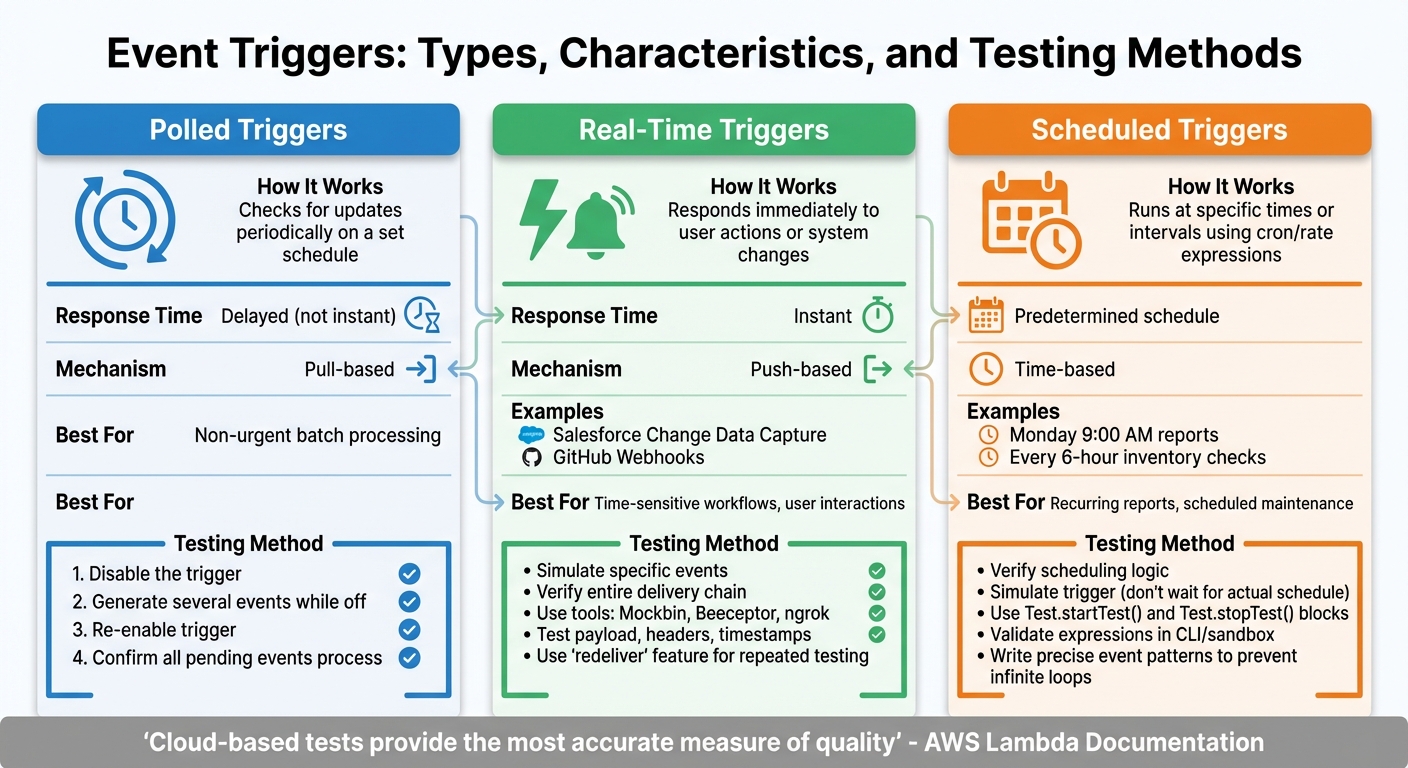
Three Types of Event Triggers: Testing Methods and Key Characteristics
Event triggers come in three main types - polled, real-time, and scheduled. Each type operates differently, requiring a unique approach to testing. Let’s break down how these triggers work and the best ways to ensure they function correctly.
Polled Triggers
Polled triggers work by periodically checking for updates. They don’t respond instantly but instead operate on a set schedule, creating a delay between the event and its detection. To test these triggers, you can simulate a catch-up scenario. Here’s how:
- First, disable the trigger.
- Generate several events while it’s turned off.
- Re-enable the trigger and confirm it processes all the pending events.
This method also ensures that the initial data fetch retrieves properly formatted live data.
Real-Time Triggers
Real-time triggers respond immediately when a user takes an action or when a system change occurs. Examples include Salesforce Change Data Capture and GitHub Webhooks. These triggers rely on a "push" mechanism, where the source system actively notifies your workflow as soon as something happens.
Testing real-time triggers involves simulating the specific event and verifying the entire delivery chain. Tools like Mockbin or Beeceptor can help by generating unique URLs to capture incoming HTTP requests. These tools allow you to inspect payloads, headers, and timestamps in real time. For local debugging, ngrok is an excellent option. Additionally, many webhook providers include a "redeliver" feature, letting you resend the same payload multiple times without triggering the source event again.
As AWS Lambda Documentation highlights:
Cloud-based tests will provide the most accurate measure of quality of both your functions and serverless applications
This makes it important to test real-time triggers in environments that closely resemble production.
Scheduled Triggers
Scheduled triggers operate based on specific times or intervals, often using cron or rate expressions. For instance, you might schedule a report to run every Monday at 9:00 AM or set a trigger to check inventory levels every six hours. Testing these triggers focuses on two aspects: verifying the scheduling logic and ensuring the workflow runs correctly at the assigned times.
Since waiting for the actual schedule to occur isn’t practical, you can simulate the trigger to test its logic immediately. For platforms like Salesforce, use Test.startTest() and Test.stopTest() blocks to isolate test limits and force asynchronous processes to complete before verifying results.
Amazon EventBridge Best Practices offers this advice:
To prevent [infinite loops], write the event patterns for your rules to be as precise as possible, so they only match the events you actually want sent to the target
Finally, use CLI tools or sandbox environments to validate your scheduling expressions and catch errors before deployment. This step ensures your triggers run smoothly without unexpected issues.
Setting Up a Testing Environment
To ensure thorough trigger testing without risking live systems, setting up a dedicated testing environment is essential. This setup allows for controlled experimentation and keeps test data, events, and automated workflows completely separate from production.
Start by defining your infrastructure to clearly isolate testing resources. For example, create dedicated cloud accounts or resource stacks specifically for testing. If you're working in a shared environment, use naming conventions like developer IDs or branch identifiers as prefixes for stack names. This helps avoid conflicts. For instance, you might prefix stack names with your personal identifier or the branch name to keep things organised and distinct.
For local testing, tools like LocalStack can help emulate AWS services such as S3, DynamoDB, and SQS. These emulators are great for replicating cloud environments on your local machine. Additionally, mock APIs can simulate external service responses, including error codes, making them valuable for testing edge cases and ensuring workflows function as expected.
When moving beyond local setups, it’s crucial to validate workflows in cloud environments that closely mirror production. This step ensures that your tests account for real-world conditions.
For platform-specific testing, leverage tools like test event buses. Take Salesforce as an example: it provides a dedicated test event bus for publishing test change events. These events don’t persist data or send messages to external systems, ensuring that your testing activities remain isolated from production. This kind of setup allows you to experiment confidently without worrying about unintended impacts on live systems.
Creating Test Data
After setting up a dedicated testing environment, the next step is crafting realistic test data. This is essential for reliable trigger testing. Without it, you risk running into false positives, deployment errors, or workflows that crumble under real user behaviour. As Salesforce Trailhead aptly states:
Creating test data is one of the most important aspects of writing useful unit tests
The guiding rule here is straightforward: each test should generate its own records, rather than relying on production data. Production data can vary, leading to inconsistent test results. Salesforce Trailhead further emphasises:
A test that you run multiple times should always either fail or pass, unless you've changed the underlying code
By creating self-contained test records, you ensure consistent, repeatable results across development, staging, and production environments. This approach also simplifies the transition to trigger test methods.
Your test data should reflect real-world scenarios. For instance, use accurate date formats like DD/MM/YYYY (standard for en-AE), complete email addresses, and realistic field values that align with your API's expectations. When testing an event trigger for form submissions, include a variety of scenarios: complete entries, omitted optional fields, and edge cases like long text strings or special characters. Focusing only on the "happy path" can leave you vulnerable to unexpected user behaviour.
Efficient test data management builds on isolated testing environments. Depending on the complexity of your tests, you can use different strategies:
- Manual record creation for straightforward tests
- Test factories for interconnected datasets
- @TestSetup for shared baselines
- CSV files to allow flexible input modifications
Always prioritise isolating test data and safeguarding sensitive information. Use dedicated test accounts for isolation, and apply data masking when working with production-like datasets to protect confidential details. Don’t overlook failure scenarios - test your error handling by sending an email to a non-existent address or using invalid data formats. This ensures your validation rules catch issues before they make it to production.
Isolating Testing Scenarios
After creating realistic test data, the next step is to ensure tests are completely isolated from the production environment. Testing directly in production can lead to unintended consequences, like triggering real customer emails, consuming live API quotas, or even corrupting data. Without proper isolation, testing can cause "noisy neighbour" issues, where testing activities disrupt the actual performance of the system. This step complements the earlier setup of a dedicated testing environment and realistic test data.
One of the most effective ways to achieve this is by using dedicated test event buses. For example, Salesforce allows test event messages to be published to a separate bus, completely isolated from the production event bus. These test events are transient - they are not stored and do not reach external systems. To enable this in Salesforce, you can use Test.enableChangeDataCapture() at the start of your test. This ensures that any record changes activate triggers only within the test context, leaving your organisation's actual settings untouched. However, keep in mind that test contexts have limits - for instance, Salesforce restricts test change event delivery to 500 messages per test to prevent system overload. This level of isolation ensures your testing activities remain separate from live operations.
If a dedicated testing environment isn’t available, mock testing becomes a crucial alternative. This approach simulates actions using mock data without running the actual processes. For instance, you can test an approval workflow without sending a real approval request, or verify email logic by directing emails to a dummy address. In situations where testing in a live environment is unavoidable, a "create then delete" pattern can help. This involves creating a temporary record, allowing the trigger to run, and then immediately deleting the record to minimise any impact on production data.
Resource management is another critical aspect of test isolation. Using Test.startTest() and Test.stopTest() blocks ensures that the resources allocated for your test setup do not interfere with the governor limits reserved for the actual execution of triggers. This approach provides a fresh set of resource limits for each test, keeping the system efficient.
Finally, implementing trigger conditions adds an extra layer of control. By using filters like OData filters, you can ensure that flows and automations only execute when specific criteria are met. This prevents unnecessary executions on irrelevant data, reducing the risk of accidental triggers in production. Pairing these conditions with automated assertions - predefined checks that verify expected behaviour - helps validate your automation without requiring manual data input in the production environment. This strategy ties back to earlier steps, reinforcing the importance of precision and isolation in testing.
Validating If/Then Logic
Once you've tested isolated scenarios, the next step is to validate your if/then logic to ensure every automation path behaves as expected. This involves verifying that conditional statements function as intended. If/Then logic plays a critical role in determining whether a trigger fires, which workflow path is followed, or if an action is executed at all. Mistakes here can lead to misdirected emails, skipped updates, or unnoticed failures.
To ensure accuracy, adopt a systematic approach using both positive and negative tests. Positive tests check that the trigger works when conditions are met. For instance, you might confirm that a record updates when a toggle is set to "On." Negative tests, on the other hand, ensure the trigger correctly ignores actions when conditions are unmet, such as verifying that no action occurs when the toggle is "Off". To simplify this process, create a test matrix. This matrix should document every condition in a structured table format, including fields like Case Number, Condition, Expected Result, and Actual Result. This approach ensures you cover all scenarios without relying on memory or guesswork. Testing under various user contexts further ensures permissions and bulk operations function as intended.
Speaking of user contexts, it's essential to verify how logic performs across different roles and permissions. Tools like System.runAs(user) can help confirm that sharing rules and permissions don't interfere with your workflow. Additionally, test your logic with bulk operations by running it against 200 or more records at once. Don't forget to include invalid data, such as null values or nonexistent email addresses, to confirm your error-handling mechanisms work properly.
Debugging tools are invaluable for tracing the execution path of your logic. Use Debug or Tracing modes to pinpoint exactly where a conditional statement might fail. As Salesforce Trailhead explains:
In an automated testing tool, assertions state the facts about what the automation should do, and the tests perform the fact-checking
Customise assertion failure messages, like "Flow did not take the Escalated path", to make troubleshooting faster and more efficient. For asynchronous workflows, automated pollers can be used to monitor status changes - timeouts often indicate a mismatch in trigger logic.
Finally, don't just rely on system messages to verify success. Check for side effects to confirm the entire logic chain executed correctly. For example, query whether a related Task was created, a specific field was updated, or an email was logged after the trigger fired. These checks provide additional assurance that your logic is functioning as intended.
Testing Methods for Event Triggers
Once you've validated your if/then logic, it's time to choose the right testing method to confirm your event triggers are functioning as intended. Each approach serves a specific purpose, ensuring your automation workflows run smoothly under real-world conditions.
Journey Testing
Journey testing is all about visualising the complete customer experience from start to finish. It's perfect for workflows where users move through multiple triggers and actions. Tools like Adobe Journey Optimizer make this process easier by providing a test mode that highlights each step, showing errors and drop-off points. This complements isolated testing by identifying issues right away.
You can reduce wait times to speed up journey testing, but some events may still need longer timeouts. Adobe Journey Optimizer limits test sessions to 100 test profiles per journey, so always use profiles flagged specifically for testing to keep real customer data safe. For workflows with decision splits, note that some systems default to the "top branch." To test other paths, you'll need to reorder branches manually. Detailed logs in JSON format provide insights into status updates (e.g., running, finished, error), transition history, and external data enrichment results.
A/B Testing for Triggers
A/B testing is a great way to figure out which variations in timing, content, or conditions work best. This method involves creating multiple versions of the same trigger and comparing their performance across similar audience groups.
One key component of A/B testing is automated assertions, which confirm whether specific criteria are met after each variation runs. For instance, in record-triggered workflows, assertions might check if a field was updated to "True" or if a certain action was completed. Define a clear hypothesis and success metrics for each variation. Don’t just track whether the trigger fired - evaluate its downstream impact on conversions, engagement, and even revenue.
Frequency and Precision Testing
This method ensures that triggers respect frequency limits, avoid duplicates, and respond accurately to user actions. It's essential for maintaining system performance and preventing customers from receiving repeated or unwanted messages.
Concurrency controls play a big role here, limiting how many instances of a flow can run simultaneously. For example, Power Automate defaults to a concurrency level of 1, meaning only one instance runs at a time unless you adjust it manually. To test bulk performance, try running the workflow with 200+ records at once. Use OData filters or specific trigger conditions to reduce system load and make testing more efficient.
You can also simulate negative scenarios, like sending emails to invalid addresses, to test error handling. For long-running actions or third-party lookups, consider using static result testing (mocking). This allows you to test specific parts of a flow with mock data, bypassing external dependencies and isolating sections for detailed analysis.
| Method | Best Used For | Key Benefit |
|---|---|---|
| Journey Testing | Multi-step customer paths | Visualises the entire workflow and identifies where profiles "drop out" |
| A/B Testing | Comparing trigger variations | Helps determine the best timing, content, or conditions for optimal results |
| Frequency and Precision Testing | High-volume workflows and duplicate prevention | Ensures consistent performance and prevents system overload during simultaneous runs |
Key Metrics for Measuring Trigger Performance
Measuring the right metrics ensures your event triggers are not just functioning but also delivering value. Below, we'll break down three key areas to focus on: conversion and revenue impact, engagement, and data accuracy. Together, these metrics paint a clear picture of how well your triggers are performing.
Conversion and Revenue Impact
To understand the financial impact of your triggers, start by measuring Conversion Lift. This metric evaluates the additional revenue generated by comparing a group exposed to triggered campaigns against a control group that isn’t. It’s a straightforward way to see if your triggers are driving results.
Another critical metric is Event Match Quality (EMQ), which scores attribution accuracy on a scale from 1 to 10. A higher EMQ means better ad optimisation and more accurate data matching - a direct reflection of the quality of your customer data.
Additionally, keep an eye on deduplication. By using consistent event_name values and unique event_id, you can avoid counting the same conversion multiple times, ensuring your data stays clean and reliable.
Engagement Metrics
Engagement metrics help you gauge how your audience interacts with triggered messages. These include:
- Click-through rates
- Open rates
- Bounce rates
- Unsubscribe rates
For more specific channels, track metrics like SMS delivery rates and push notification opens. When analysing workflow goals, it’s essential to distinguish between first-time enrollments and re-enrollments. This prevents overcounting and provides a more accurate view of unique user interactions.
Data Accuracy and Completeness
Triggers are only as good as the data they rely on. Start by measuring code coverage, which indicates the percentage of trigger logic tested. Aim for 100% coverage to ensure every conditional path has been validated.
Monitoring trigger parsing issues is equally important. These issues can disrupt how incoming event data is interpreted, leading to inaccurate results.
Finally, keep an eye on trigger concurrency and parallelism. Overloading your system with too many simultaneous executions can lead to problems like unresponsiveness or outdated data being processed (known as "dirty reads"). For example, in Salesforce testing, a maximum of 500 change event messages can be processed before the system halts with a fatal error.
| Metric Category | Key Indicators | Purpose |
|---|---|---|
| Conversion & Revenue | Conversion Lift, Event Match Quality (EMQ), Deduplication Rate | Measure financial impact and attribution accuracy |
| Engagement | Click-through rates, open rates, bounce rates, unsubscribe rates | Evaluate audience response to triggered messages |
| Data Quality | Code Coverage, Trigger Parsing Issues, Concurrency Levels | Ensure data reliability for accurate decision-making |
Common Mistakes and How to Fix Them
When it comes to testing event triggers, knowing where things typically go wrong can be a game-changer. Many teams encounter predictable issues that are, fortunately, easy to address with the right strategies.
Imprecise Trigger Logic
Setting up vague or overly broad trigger conditions can lead to unintended consequences. Take this example: a developer working with AWS configured a trigger to monitor acme.payments events, intending to catch only "Payment accepted" events. However, when new "Payment rejected" events were added under the same source, both event types started triggering the workflow. This caused processing errors and unnecessary costs.
To avoid this, apply detailed filtering. Use metadata like source, account, and region, alongside content-based filters (e.g., numeric ranges or text prefixes), to make your triggers more precise. As the Amazon EventBridge Documentation explains:
The more precise your event pattern, the more likely it will match only the events you actually want it to, and avoid unexpected matches when new events are added to an event source.
Another common pitfall is creating infinite loops - triggers that repeatedly fire because they detect their own actions. For instance, a rule designed to detect ACL changes on an S3 bucket might trigger a corrective script, which in turn causes the rule to fire again. Testing your patterns in sandbox environments or using tools like test-event-pattern can help you catch these issues early.
Overloading Systems
Triggers that fire too often or handle excessive volumes can overwhelm your systems. This often results in delayed event delivery, throttling, or "dirty reads", where workflows process outdated data because earlier updates haven’t completed.
To prevent these problems, set concurrency limits. These limits help your system stay responsive, even during traffic spikes.
Unmanaged Edge Cases
Focusing only on the "happy path" - where everything works perfectly - can leave your system exposed to unexpected scenarios. For example, some teams test only single-record operations and overlook bulk operations or failure scenarios.
A better approach is to build a detailed test matrix that covers all possible outcomes. Make sure to test error handling for both single-record and bulk operations.
Additionally, consider transient errors - temporary failures that might resolve with retries. Many platform event triggers allow up to 10 retry attempts before moving to an error state. To handle these effectively, implement retryable exceptions and use tools like setResumeCheckpoint. This ensures that your system can pick up from the last successfully processed event if a trigger fails due to a limit exception.
By addressing these common issues, you can significantly improve the reliability of your event triggers.
| Mistake Type | Warning Signs | Quick Fix |
|---|---|---|
| Imprecise Logic | Triggers firing for unintended events | Use specific metadata filters and content-based rules |
| System Overload | Throttling, delays, dirty reads | Implement concurrency limits |
| Unmanaged Edge Cases | Failures with bulk operations or unusual data | Create systematic test matrices and simulate failures |
How Wick's Four Pillar Framework Supports Trigger Testing

Wick's Four Pillar Framework offers a structured approach to enhance trigger testing. It helps refine testing protocols while simplifying workflow customisation and ensuring scalability. Successful trigger testing goes beyond technical tools, requiring a combination of data validation, tailored workflows, and scalable systems.
Capture & Store for Data Validation
The Capture & Store pillar is all about maintaining data integrity at every step. By using simulated records, businesses can test data states without impacting live databases. Schema validation ensures that payloads meet structure, type, and field requirements. For companies managing large volumes of web events, redundant event setups - where the same events are sent through multiple tools like Pixel and API - help prevent data loss and improve EMQ scores.
Additionally, normalising ID structures and cleaning values (like trimming extra spaces) during this phase ensures consistency across all trigger points. With reliable data in place, businesses can create workflows that align seamlessly with user actions.
Tailor & Automate for Workflow Personalisation
The Tailor & Automate pillar focuses on ensuring that workflows execute as intended. Using "if/then" logic, this step validates that actions - such as sending a welcome email or delivering a personalised offer - are triggered correctly after user events like sign-ups or purchases. Automated assertions play a key role here, verifying that workflows follow the correct decision paths and execute the right actions. As Salesforce explains:
In an automated testing tool, assertions state the facts about what the automation should do, and the tests perform the fact-checking.
Precise trigger conditions, set using OData filters, ensure workflows activate only under specific circumstances. Concurrency control also helps manage parallel executions, avoiding issues like performance bottlenecks or data inconsistencies.
Custom Pricing Plans for Scalable Testing
Wick's pricing plans cater to businesses of all sizes, offering tailored solutions for different testing needs. The Advanced plan is ideal for mid-sized businesses, helping automate repetitive regression tests and cutting manual efforts by up to 40% while maintaining software quality. For larger organisations, the Enterprise plan provides advanced features like parallel execution, reducing regression testing cycles from two days to under four hours. These plans also include AI-powered self-healing capabilities, which adapt tests automatically when UI or event structures change, minimising ongoing maintenance costs.
To secure large-scale operations, Enterprise plans offer Role-Based Access Control (RBAC) and IP whitelisting, protecting publicly accessible webhook endpoints. These features ensure reliable performance as trigger volumes grow across different environments.
| Plan Level | Testing Capability | Key Benefit |
|---|---|---|
| Advanced | High-value regression automation | Cuts manual effort by 40% |
| Enterprise | Parallel execution with AI self-healing | Reduces regression cycles from days to hours |
| Enterprise | RBAC and IP whitelisting | Secures webhook endpoints at scale |
Conclusion
Testing event triggers is the backbone of effective marketing automation. Skipping thorough testing can lead to workflows that seem fine on the surface but produce unexpected outcomes, potentially damaging customer relationships. As Ami Heitner wisely points out:
A poorly configured system can do more harm than good, annoying prospects with irrelevant messages and burning valuable leads before they ever have a chance to convert.
When done right, accurate trigger testing delivers measurable results. Trigger-based emails, for instance, are 497% more effective, with campaigns boasting a 22% higher open rate and a 7% higher click-through rate compared to standard emails. However, these impressive numbers only come to life when triggers are tested across all scenarios - positive outcomes, negative cases, bulk operations, and edge conditions.
By validating logic, confirming data accuracy, and simulating failures, businesses can safeguard their brand reputation while enhancing performance. Testing for both successful outcomes and error responses ensures that automation handles real-world conditions, from single records to bulk operations, without breaking under pressure.
A well-rounded testing strategy combines step-by-step validation with systematic checks. Test every new step immediately and simulate failures to ensure error-handling mechanisms are solid. Use isolated test data to confirm that both expected actions and fallback responses function as planned. This approach ensures that your automation aligns seamlessly with business processes and delivers reliable outcomes.
Ultimately, rigorous testing protects the customer experience and enables scalable growth. When triggers execute accurately, route leads correctly, and respond to user actions precisely, businesses can confidently expand their automation workflows, knowing they’re built on a solid foundation.
FAQs
How can I prevent event triggers from overloading my system?
To prevent system overload caused by event triggers, it’s crucial to focus on refining their design and keeping a close eye on their performance. Start by setting clear and specific conditions for your triggers, ensuring they activate only when absolutely necessary. Avoid infinite loops by implementing safeguards that prevent the same event from re-triggering. Additionally, assign just one target per rule to make troubleshooting simpler and minimise the risk of cascading issues.
Introduce retry mechanisms with gradual back-off strategies to handle temporary errors without overwhelming downstream systems. Keep an eye on key performance metrics like execution counts and latency, and set up alerts to catch potential problems early. Limiting concurrency where possible can also help maintain predictable and manageable resource usage.
For customised solutions, Wick provides expert support in designing and monitoring automation workflows tailored specifically for the UAE market. By following these practices, you can improve system reliability and ensure your automation processes run smoothly.
How can I effectively test real-time triggers in automation workflows?
To effectively test real-time triggers, focus on three key areas: simulation, automation, and monitoring.
Start by using mock endpoints to mimic downstream services without interfering with live systems. This approach allows you to test event payloads, headers, and security validations in a controlled environment. Begin with local testing, then gradually transition to scenarios that closely resemble production to ensure everything works as expected.
Next, streamline your testing process with automation. Leverage tools or platform-specific features to create test cases for every workflow branch. Running these tests after updates can help identify potential problems early. Automated testing not only ensures consistency but also saves time by reducing manual effort.
Lastly, set up monitoring systems to keep an eye on trigger performance in real time. Track key metrics like delivery timestamps, response codes, and payload details. Configure alerts for issues such as repeated failures or delays to address them swiftly. Wick’s marketing automation solutions incorporate these practices, helping UAE-based businesses maintain smooth workflows and minimise interruptions.
How can I create realistic test data for testing event triggers in automation workflows?
To generate realistic test data for event trigger testing, start by pinpointing the fields your trigger depends on. These typically include Name, Email, Phone Number, Address, and Order Amount (e.g., AED 1,234.56). Use a mock-data generator to craft a dataset that reflects everyday scenarios. Make sure to configure fields using UAE-specific formats, such as phone numbers (+971 5X XXXXXXX), dates (DD MMM YYYY), and amounts in AED.
Introduce constraints to maintain data accuracy. For instance, ensure cities are correctly matched with their emirates (like Dubai ↔ Dubai City) and set reasonable value ranges for order amounts (e.g., AED 100 to AED 10,000). Once your dataset is ready, export it in a format that fits your workflow, such as CSV or JSON, and load it into your testing environment to assess how well your triggers perform.
Tip from Wick: Using UAE-specific and realistic test data helps you create reliable automation workflows. This reduces errors and boosts the success of your marketing campaigns.